<?xml version="1.0" encoding="utf-8"?>
<feed xmlns="http://www.w3.org/2005/Atom">
  <title><![CDATA[Slary 博客]]></title>
  <subtitle><![CDATA[当一个优秀的设计师是种什么样的体验？]]></subtitle>
  <link href="/atom.xml" rel="self"/>
  <link href="http://slaryme.github.io/"/>
  <updated>2015-12-02T03:40:23.421Z</updated>
  <id>http://slaryme.github.io/</id>
  
  <author>
    <name><![CDATA[slaryme]]></name>
    <email><![CDATA[slaryme@gmail.com]]></email>
  </author>
  
  <generator uri="http://hexo.io/">Hexo</generator>
  
  <entry>
    <title><![CDATA[Android和IOS的设计稿尺寸详解]]></title>
    <link href="http://slaryme.github.io/2015/05/02/Android%E5%92%8CIOS%E7%9A%84%E8%AE%BE%E8%AE%A1%E7%A8%BF%E5%B0%BA%E5%AF%B8%E8%AF%A6%E8%A7%A3/"/>
    <id>http://slaryme.github.io/2015/05/02/Android和IOS的设计稿尺寸详解/</id>
    <published>2015-05-02T01:36:31.000Z</published>
    <updated>2015-12-02T03:40:23.421Z</updated>
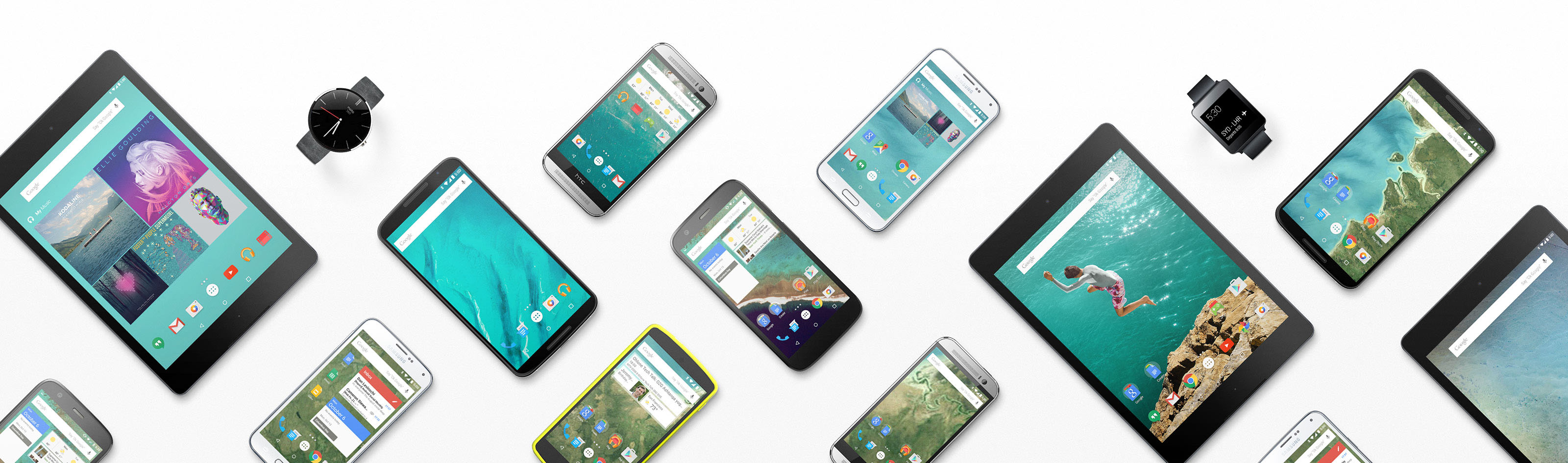
    <content type="html"><![CDATA[<p>作为一个UI设计师，在做移动应用之初会遇到这样的问题：我们的App产品会用在几类移动终端？每种终端系统设计规范是否有较大区别？对每类终端画布尺寸设计多大，图标和字体大小如何确定，以及切图切几套等等的问题。这里我将分享以Android和IOS为主的App应用设计知识，毕竟目前Windows Phone的市场还太小。<br><img src="/images/android_screen/android_devices.jpg" alt=""></p>
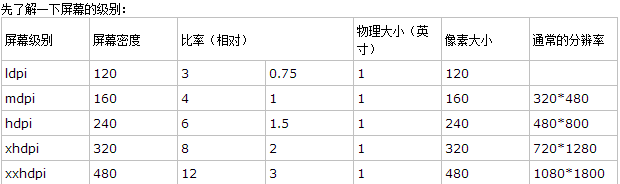
<h2 id="Android篇">Android篇</h2><p>Android设备的种类繁多，屏幕大小各异，借用我司程序员的术语：碎片化超级严重。在设计App的时候，需要将适配考虑进去，这里介绍一下Android常规的屏幕分辨率和对应的参数，ldpi(低分辨率),mdpi(标准分辨率),hdpi(高分辨率),xhdpi(超高分辨率)。<br><img src="/images/android_screen/android_screen_size.png" alt=""><br>这里先科普一些基础知识：</p>
<h4 id="px">px</h4><p>px是pixel的缩写，即像素，它是数字图像在计算机图形学中基本元素，即屏幕上的最小单位。通常用来指代电子设备的分辨率：<br>如我们所说的分辨率1280 × 720，实际上就是竖屏上面总共的像素点1280,横屏上面像素点为720个。</p>
<h4 id="inch">inch</h4><p>inch，英寸，屏幕长度计量单位，一英寸等于2.54厘米。一般常说的5英寸大小的手机是指手机的对角线是5英寸，12.7cm长。</p>
<h4 id="ppi(IOS)">ppi(IOS)</h4><p>pixel per inch，每英寸上面的像素点。</p>
<h4 id="dpi">dpi</h4><p>dot per inch，每英寸上面的点，打印分辨率 （每英寸所能打印的点数，即打印精度，Android采用打印分辨率），即Android手机的屏幕密度，这里dpi=ppi。对于4.5英寸，1280 × 720分辨率的手机，我们可以通过对角线上的分辨率除以屏幕大小4.5英寸得到dpi。注意：对角线分辨率通过长1280,宽720做勾股定理算出。<br><img src="/images/android_screen/android_gongshi.png" alt=""><br>算出dpi为326,非常接近320。<br>科普环节到此结束，对于多分辨率的Android而言，在为一个图标定义长宽的时候，使用的是dip的单位（如50dip），这时候图标会根据手机的屏幕密度，自动调整换算成px，这里会用到公式： px = dp × (dpi / 160) (标准情况是160)。如在1280×720的手机上，50dp的图形就是px = 50 × (dpi / 160)=50 × (320 / 160)=100px。那知道这个对我们设计师有什么影响呢？那就是我们在设计的时候要找一个标准基础，比如目前主流的手机是1280×720,或是1334×750,这两种屏幕密度都差不多为320，查看上图屏幕尺寸表，对应xhdpi。这个时候，新建一个画布1334×750,然后再画布上设计视觉稿，打上各种标注之后给Android开发小组，这个时候，他们就可以根据标注图上的PX,采用公司  dp = px /(dpi / 160)，换算成dp。这样就可以。而我们设计师所做的就是找到一个主流的手机分辨率作为基础标准，然后设计即可，主流手机的分辨率，友盟有统计，<a href="http://umindex.com/#android_resolution" target="_blank" rel="external">点击产看</a>。对于字体Android使用的是sp，计算方式和dp相同，sp = px/(dpi / 160)。主流的是12sp，14sp，16sp，18sp，不过自己可以随便定义，根据视觉稿的大小调整就可以了。</p>
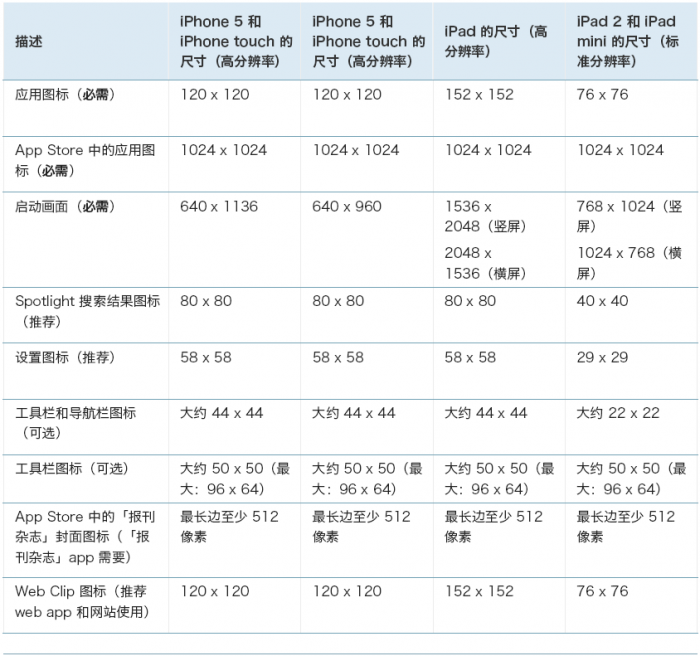
<h2 id="IOS篇">IOS篇</h2><h4 id="ppi">ppi</h4><p>pixel per inch，每英寸上面的像素点。iPhone手机的屏幕密度。<br>IOS不像Android无数种分辨率，这里列出ihone手机系统版本和相关参数<br><img src="/images/ios_screen.png" alt=""><br>目前IOS适配以上手机就可以了，根据手机分辨率做出3套图形即可。</p>
]]></content>
    <summary type="html">
    <![CDATA[<p>作为一个UI设计师，在做移动应用之初会遇到这样的问题：我们的App产品会用在几类移动终端？每种终端系统设计规范是否有较大区别？对每类终端画布尺寸设计多大，图标和字体大小如何确定，以及切图切几套等等的问题。这里我将分享以Android和IOS为主的App应用设计知识，毕竟目前]]>
    </summary>
    
      <category term="APP设计" scheme="http://slaryme.github.io/tags/APP%E8%AE%BE%E8%AE%A1/"/>
    
      <category term="Design" scheme="http://slaryme.github.io/categories/Design/"/>
    
  </entry>
  
  <entry>
    <title><![CDATA[写作利器MarkDown]]></title>
    <link href="http://slaryme.github.io/2015/04/10/%E5%86%99%E4%BD%9C%E5%88%A9%E5%99%A8MarkDown/"/>
    <id>http://slaryme.github.io/2015/04/10/写作利器MarkDown/</id>
    <published>2015-04-10T03:05:29.000Z</published>
    <updated>2015-12-02T02:44:01.751Z</updated>
    <content type="html"><![CDATA[<h2 id="引用语法">引用语法</h2><figure class="highlight plain"><table><tr><td class="gutter"><pre><span class="line">1</span><br></pre></td><td class="code"><pre><span class="line">&#62; &#24341;&#29992;&#19968;&#10;&#62; &#22810;&#34892;&#24341;&#29992;</span><br></pre></td></tr></table></figure>
<p>引用效果</p>
<blockquote>
<p>引用一<br>多行引用</p>
</blockquote>
<h2 id="链接语法">链接语法</h2><figure class="highlight plain"><table><tr><td class="gutter"><pre><span class="line">1</span><br></pre></td><td class="code"><pre><span class="line">http://daviddone.com - automatic!&#10;[daviddone](http://daviddone.com)</span><br></pre></td></tr></table></figure>
<p>链接效果<br><a href="http://daviddone.com" target="_blank" rel="external">http://daviddone.com</a> - automatic!<br><a href="http://daviddone.com" target="_blank" rel="external">daviddone</a></p>
<h2 id="图片语法">图片语法</h2><figure class="highlight plain"><table><tr><td class="gutter"><pre><span class="line">1</span><br></pre></td><td class="code"><pre><span class="line">![&#22270;&#29255;](/images/hexo_scenery.png)</span><br></pre></td></tr></table></figure>
<p>图片效果：<br><img src="/images/hexo_scenery.png" alt="图片"></p>
<h2 id="h2标题语法：">h2标题语法：</h2><figure class="highlight plain"><table><tr><td class="gutter"><pre><span class="line">1</span><br></pre></td><td class="code"><pre><span class="line">## &#31895;&#20307;&#27880;&#24847;&#31354;&#26684;&#65292;h1&#20026; #</span><br></pre></td></tr></table></figure>
<p>h2标题语法效果：</p>
<h2 id="粗体注意空格">粗体注意空格</h2><h2 id="列表语法：">列表语法：</h2><figure class="highlight plain"><table><tr><td class="gutter"><pre><span class="line">1</span><br></pre></td><td class="code"><pre><span class="line">&#25968;&#23383;&#21015;&#34920;:&#10;1. One&#10;2. Two&#10;&#22278;&#28857;&#21015;&#34920;:&#10;* &#36825;&#26159;&#22278;&#28857;&#21015;&#34920;&#10;&#36873;&#25321;&#21015;&#34920;:&#10;- &#36873;&#25321;&#21015;&#34920;&#19968;&#10;- &#36873;&#25321;&#21015;&#34920;&#20108;&#10;  - &#21015;&#34920;&#20108;&#20043;&#19968;&#10;  - &#21015;&#34920;&#20108;&#20043;&#20108;</span><br></pre></td></tr></table></figure>
<p>数字列表:</p>
<ol>
<li>One</li>
<li>Two<br>圆点列表:</li>
</ol>
<ul>
<li>这是圆点列表<br>选择列表,</li>
</ul>
<ul>
<li>选择列表一</li>
<li>选择列表二<ul>
<li>列表二之一</li>
<li>列表二之二</li>
</ul>
</li>
</ul>
<h2 id="视频引用语法：">视频引用语法：</h2><figure class="highlight plain"><table><tr><td class="gutter"><pre><span class="line">1</span><br></pre></td><td class="code"><pre><span class="line">&#60;iframe height=300 width=400 src=&#34;http://v.163.com/swf/video/NetEaseFlvPlayerV3.swf?topicid=0001&#38;vid=VB4N1A727&#38;sid=VB461LS0K&#38;coverpic=http://vimg1.ws.126.net/image/snapshot/2015/10/2/8/VB4N1A728.jpg&#38;autoplay=false&#34; frameborder=0 allowfullscreen&#62;&#60;/iframe&#62;</span><br></pre></td></tr></table></figure>
<p>效果如下：</p>
<p><iframe height="300" width="400" src="http://v.163.com/swf/video/NetEaseFlvPlayerV3.swf?topicid=0001&vid=VB4N1A727&sid=VB461LS0K&coverpic=http://vimg1.ws.126.net/image/snapshot/2015/10/2/8/VB4N1A728.jpg&autoplay=false" frameborder="0" allowfullscreen></iframe><br>注意,MD完全支持 Html。</p>
]]></content>
    <summary type="html">
    <![CDATA[<h2 id="引用语法">引用语法</h2><figure class="highlight plain"><table><tr><td class="gutter"><pre><span class="line">1</span><br></pre></td><td clas]]>
    </summary>
    
      <category term="markdown" scheme="http://slaryme.github.io/tags/markdown/"/>
    
      <category term="Technology" scheme="http://slaryme.github.io/categories/Technology/"/>
    
  </entry>
  
</feed>